.webp)
10 Essential Tips for Storing Electronics Safely in a Storage Unit
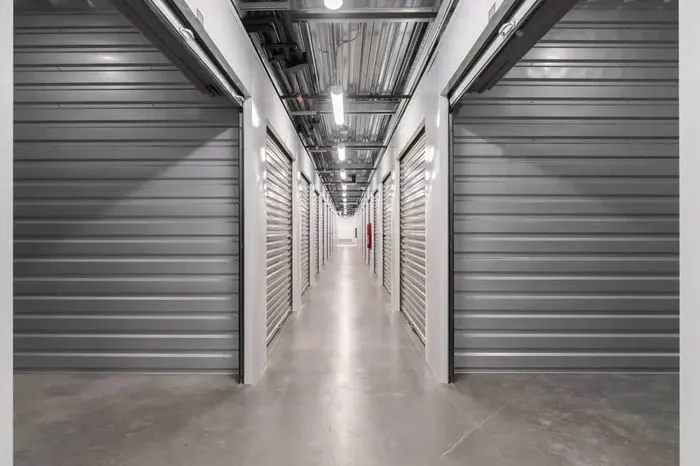
Storing electronics like computers, laptops, televisions, gaming consoles, monitors, and other devices requires careful planning to prevent damage, deterioration, or data loss. Whether you're using a self-storage unit for short-term or long-term needs, following the right tips for storing electronics safely in a storage unit can help maintain their condition. Improper handling can lead to problems like corrosion, scratches, or even permanent data loss. In this guide, we’ll walk you through the key steps—from preparation to long-term maintenance—to ensure your electronics stay safe, secure, and functional.
Preparing Electronics for Storage
Before placing your electronics in a storage unit, thorough preparation is key. Start by creating an inventory checklist of all items, including computers, laptops, televisions, gaming consoles, monitors, drives, and accessories like cables and batteries. This helps track everything and prevents forgetting anything important. Clean each device to remove dust, which can cause corrosion over time. For fragile components, such as screens or internal drives, handle with care to avoid scratches or damage.
Remove batteries from any devices to prevent leakage that could lead to deterioration. Back up data from computers, laptops, and drives to ensure nothing is lost. Disassemble larger items like gaming consoles or computer towers if possible, noting reassembly steps for later. Wrap cords and cables neatly to avoid tangles. This preparation phase sets the foundation for safe storage, protecting your electronics from potential issues in the storage environment.
Choosing the Right Storage Unit
Selecting the appropriate storage unit is crucial for your electronics. Opt for a climate-controlled unit to manage temperature and humidity, as fluctuations can cause damage to sensitive components. Self-storage facilities often offer these units, which maintain a stable environment to prevent moisture buildup and corrosion.
Consider the size of the unit based on your items—ensure there's enough space for computers, televisions, monitors, and other devices without overcrowding. Look for units with secure access to protect against theft. Evaluate the location; choose one that's convenient but also in a safe area. Factor in features like shelving or pallets to keep items off the floor, avoiding dust and potential water damage. By choosing wisely, you safeguard your electronics from environmental hazards and maintain their condition over extended periods.
Proper Packaging Techniques
Effective packaging is essential to protect electronics during storage. Use sturdy boxes and containers tailored to the size of each item, such as laptops, televisions, or gaming consoles. Incorporate insulation and padding like bubble wrap to cushion fragile devices and prevent scratches or impacts.
For added protection, include silica gel packets in boxes to absorb any moisture. Wrap screens and monitors in dust covers or soft cloths to shield against dust and scratches. Secure cables and accessories in separate bags, labeling them clearly. Place heavier items at the bottom and lighter ones on top to avoid crushing. This way, you ensure everything is packed securely, minimizing the risk of damage or deterioration while in the storage unit.
Climate Control Considerations
Climate control is a top priority when storing electronics. Temperature fluctuations can lead to condensation, causing moisture damage and corrosion in devices like computers and drives. Humidity levels should be kept low to prevent these issues, ideally in a controlled environment.
Choose a storage unit with climate control features to maintain consistent conditions. This is especially important for sensitive items such as laptops, gaming consoles, and televisions, where extreme heat or cold can warp components or affect batteries. Monitor the unit's settings if possible, ensuring they're optimized for electronics. By prioritizing climate control, you protect your items from environmental deterioration and extend their lifespan, avoiding costly repairs down the line.
Organizing and Labeling Boxes
To keep your storage unit efficient, organize and label boxes meticulously. Group similar items together—place computers with their accessories, televisions with remotes, and gaming consoles with controllers. Use clear labels on every box, detailing contents like "Laptops and Cables" or "Monitors and Screens."
Create an inventory checklist to map out locations within the unit, noting where each box or container is placed. This organization prevents rummaging through everything when you need a specific item, reducing the risk of accidental damage. Arrange shelves or shelving units to maximize space, keeping fragile devices on stable surfaces away from the floor. Labeling ensures quick access and helps maintain order over multiple visits or extended storage times.
Protecting Against Dust and Moisture
Dust and moisture are major threats to electronics in storage. Use dust covers over items like monitors, televisions, and computer towers to block airborne particles that could cause corrosion or buildup on screens and components. Incorporate silica gel packets in boxes and bags to absorb humidity, preventing moisture-related damage.
Elevate items on pallets or shelves to avoid floor-level dust and potential water exposure. Seal containers tightly and consider anti-static bags for sensitive drives and devices. Regularly check the storage environment for any signs of humidity or dust accumulation. This protection strategy safeguards your electronics, ensuring they remain in top condition without deterioration from these common hazards.
Stacking and Arranging Items Safely
Safe stacking and arranging prevent physical damage in your storage unit. Place heavier items like televisions or computer units at the bottom, with lighter accessories on top. Use padding between layers to cushion and secure everything, avoiding shifts that could cause scratches or breaks.
Arrange on shelves or pallets to keep devices off the floor, protecting against dust and moisture. Ensure fragile items, such as laptops and gaming consoles, are not stacked too high to minimize fall risks. Organize cords and cables in designated boxes to prevent tangling. This careful arrangement optimizes space while maintaining a secure environment, reducing the chance of any issues during storage.
Ensuring Accessibility
Accessibility in your storage unit makes retrieval straightforward. Position frequently needed items near the front, like essential cables or batteries, while storing less-used devices deeper inside. Use clear pathways between shelves and boxes to navigate easily without disturbing anything.
Label locations on your inventory checklist for quick reference, noting steps to reach specific components. This setup ensures you can access data drives or monitors without hassle, saving time and preventing accidental damage. Keep the unit organized to maintain this accessibility over multiple visits, allowing you to handle reassembly or checks efficiently whenever needed.

Preventing Theft and Vandalism
Security measures are vital to prevent theft and vandalism of your electronics. Choose a storage facility with robust features like surveillance, secure locks, and gated access. Use additional locks on your unit and consider insurance for high-value items such as computers, televisions, and gaming consoles.
Avoid advertising contents; keep boxes generic without visible labels indicating valuables. Position fragile or expensive devices deeper in the unit, away from easy reach. Regularly visit to check for any tampering signs. By taking these precautions, you protect your items from external threats, ensuring peace of mind during storage periods.
Regular Maintenance and Checks
Ongoing maintenance keeps your electronics in optimal condition. Schedule regular checks every few months to inspect for dust, moisture, or corrosion on devices like laptops, monitors, and drives. Clean any buildup and replace silica gel packets as needed.
Test batteries and components if possible, ensuring no deterioration has occurred. Update your inventory checklist with observations, noting the condition of each item. Address issues promptly, such as reorganizing shifted boxes or adding more padding. This proactive care prevents long-term damage, maintaining the functionality of your storage items over time. By staying vigilant, you safeguard everything in your unit effectively.
Conclusion
Storing electronics safely takes a bit of planning and care. By preparing your devices, choosing the right storage unit, and protecting them from dust, moisture, and damage, you can keep them in great shape. Be sure to check on them regularly to catch any issues early. Following these tips will help your electronics stay safe and ready to use when you need them again. At STORAGExperts, we’re dedicated to helping you protect your belongings, and we’ve also published many helpful blog posts packed with tips on storage units and home organization.
If you're looking for a secure storage unit in Scottsdale, AZ, STORAGExperts has you covered. Whether you’re storing electronics, furniture, or seasonal items, we offer clean, reliable units designed to keep your belongings safe. Our team is here to help you choose the right size and setup based on your needs.
Contact STORAGExperts at Shea - Scottsdale, AZ today to reserve your unit and enjoy peace of mind knowing your items are in good hands.
Frequently Asked Questions
Why is climate control important for storing electronics?
Climate control keeps temperature and humidity stable, preventing moisture, corrosion, or damage to devices like computers, laptops, and televisions.
What’s the best way to pack fragile electronics?
Use sturdy boxes, bubble wrap, and padding to protect fragile items like screens and monitors. Add silica gel packets to absorb moisture and prevent deterioration.
How should I organize my storage unit?
Label boxes clearly, group similar items like cables and accessories, and use shelves or pallets to keep electronics off the floor for easy access and protection.
How can I protect my electronics from dust?
Cover devices with dust covers, seal boxes tightly, and elevate items on shelves to avoid dust buildup, which can cause corrosion or scratches.
What should I do before storing my electronics?
Back up data, remove batteries, clean devices, and create an inventory checklist to track everything and ensure proper reassembly later.